

Your account is the doorway to everything on our platform — the pokies lobby, live dealer tables, your bonus balance, your transaction history and the safer gambling controls we make available to every player in New Zealand. Getting through that doorway should take seconds, not minutes, and it should never leave you guessing about where your details went or whether your session is secure. This page walks you through the whole thing, from the very first sign-in after registration to the awkward moments when a password refuses to work at eleven o’clock on a Friday night.
We wrote this guide specifically for players logging in from Auckland, Christchurch, Wellington, Dunedin and everywhere in between, using NZD balances and the connection speeds you actually get on a home fibre plan or a mobile network out in the regions. Rather than repeating the obvious “enter your email and password” line, we have set out what happens behind the scenes, what our verification team looks at, and which small habits genuinely reduce the chance of you being locked out of your own funds.
If you have not created an account yet, the sign-in form will not do much for you — start at Captain Cooks Casino and register first, then come back to this page once you have credentials to work with. Everything below assumes you already hold an account with us and simply want to reach it quickly, safely and without repeated friction.
Reaching Your Account in Four Deliberate Steps
The sign-in process on our website is intentionally short. Each step exists for a reason, and understanding those reasons makes the whole flow feel less like a formality and more like a security checkpoint that works in your favour.
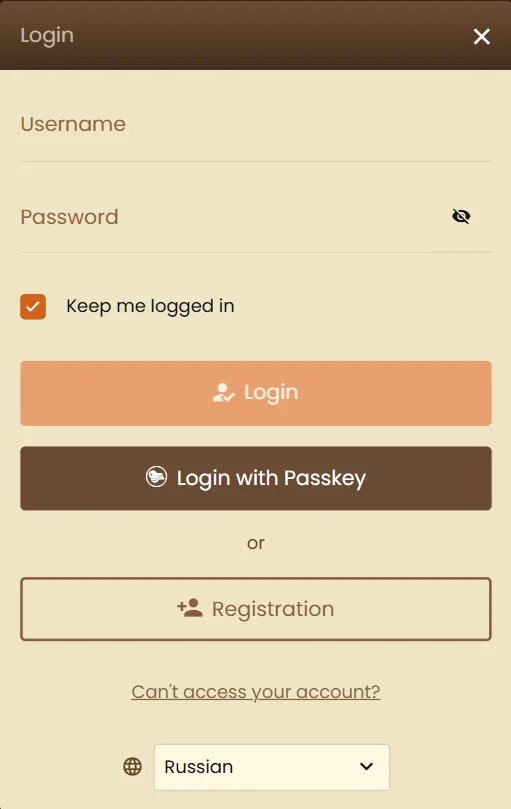
- Open the sign-in panel. The access button sits in the upper corner of every page on our site, so you never have to hunt through menus. On smaller screens it collapses into the navigation drawer, but the position stays consistent between pages.
- Enter your registered email address. This must be the exact address you used at registration. Aliases, plus-addressing variants or a second mailbox you forwarded to will not be recognised as the same account.
- Type your password carefully. Our field is case sensitive. Use the reveal icon if you are on a mobile keyboard that likes to capitalise the first character without asking permission.
- Confirm and land in the lobby. Once authenticated, you arrive at the games hub with your NZD balance, active promotions and any pending withdrawal displayed in the account panel.
A practical tip that saves a surprising amount of hassle: complete your first sign-in on the same device you intend to use most often. Our system builds a light behavioural profile from that session, which reduces the number of additional checks triggered later when you play from the same place.
What You Need Ready Before You Attempt Access
Most failed sign-ins are not caused by anything dramatic. They come down to a missing detail that was never written down properly in the first place. Before you tap the access button, make sure the following are within reach.
- The email address tied to your account, spelled exactly as registered, including the domain.
- Your current password — not the one you set six months ago and changed after a promotion email.
- Access to your email inbox, since password resets and occasional confirmation codes land there.
- A phone number that still works, if you enabled two-step confirmation during registration.
- A stable connection, because a dropout mid-authentication can leave a half-open session that our system will close for safety.
Players who use a password manager have a noticeably smoother time of it. If you would rather not install one, a written note kept somewhere physically secure at home is still safer than reusing a password from your email or banking login. What matters is that the credential belonging to our platform is not shared with any other service you hold.
Access Across Devices: Browser, Mobile and Downloadable Software
Kiwi players split fairly evenly between phones and desktops, and our sign-in behaves slightly differently depending on which route you take. The credentials themselves never change — one account, one email, one password — but the surrounding experience does.
Instant Play in a Browser
The browser route needs nothing installed. Open our website in Chrome, Safari, Firefox or Edge, sign in, and the full game library streams straight to you. This is the most flexible option if you switch between a work laptop and a home machine, since nothing is stored on the device beyond a session cookie you can clear at any time.
One caution worth flagging: private or incognito windows discard your session the moment you close the tab. That is excellent for shared computers and mildly annoying if you keep wondering why you have to re-enter details every single evening.
Signing In from a Phone or Tablet
Our mobile layout carries the same authentication form, scaled for thumbs. Biometric unlock — Face ID or a fingerprint — can be used to autofill saved credentials through your device’s own keychain, though the authentication itself still happens on our servers. If you play on mobile data while travelling between regions, expect the occasional extra confirmation step when your IP address changes rapidly.
The Downloadable Casino Client
Some players still prefer a dedicated desktop client for the faster load times and the larger local game cache. The first launch asks for your full credentials; after that, the client can remember you on that machine. Treat this convenience carefully — anyone with access to that computer effectively has access to your balance, so it belongs on a personal device only, never a flatmate’s shared PC.
Comparing Your Access Routes at a Glance
The table below sets out how the three access methods differ in practice, so you can pick the one that suits your habits rather than defaulting to whichever you tried first.
| Access method | Setup required | Session persistence | Best suited to | Main trade-off |
|---|---|---|---|---|
| Browser instant play | None — open and sign in | Until cookies are cleared | Players who switch devices often | Slightly slower game loading on older machines |
| Mobile web | None, biometric autofill optional | Persists unless the browser purges data | Short sessions on the commute or the couch | Extra checks when the network changes frequently |
| Desktop client | One-off download and installation | Can remain signed in on that machine | Regular players with a personal computer | Tied to a single device and needs updates |
None of these routes gives you a different balance or a separate bonus wallet. Your account is unified, so a deposit made on your phone in the morning is instantly visible on the desktop client that evening.
When the Sign-In Form Pushes Back
Everyone hits a rejected login eventually. The message on screen is usually deliberately vague — that is a security measure, not laziness — so it helps to know which underlying cause matches which symptom.
Start with the simplest explanations before assuming something serious has happened to your account. In our experience, roughly four out of five access complaints resolve within a couple of minutes once the player checks the basics.
| What you see | Most likely cause | What to do next |
|---|---|---|
| “Details not recognised” | Typo, wrong email variant or caps lock engaged | Retype slowly, reveal the password, confirm the email domain |
| Page reloads without signing you in | Stale cookies or an aggressive browser extension | Clear site data, disable ad-blocking for our domain, try again |
| Reset email never arrives | Filtered into spam or sent to an older mailbox | Search all folders, then contact support with your account details |
| Access granted, then immediately dropped | Unstable connection breaking the session handshake | Switch between Wi-Fi and mobile data, then reconnect |
| Account temporarily restricted | Repeated failed attempts or a pending verification request | Wait out the cooling period and check your inbox for a document request |
If none of the above matches your situation, our support team can look at the account from the inside. Have your registered name, email and approximate date of registration ready — it speeds things up considerably and lets the agent confirm identity without a long back-and-forth.
Recovering a Password Without Losing Your Evening
Forgotten passwords are the single most common reason players contact us, and the recovery route is deliberately self-service so you are not waiting on a queue.
- Select the recovery link directly beneath the password field on the sign-in panel.
- Enter the email address registered to the account and submit the request.
- Open the message we send and follow the secure link, which expires after a short window for security reasons.
- Create a new password that you have never used on another website.
- Return to the sign-in form and access your account with the new credential.
Do not request the reset email several times in a row. Each new request invalidates the previous link, which is exactly how people end up clicking a dead link and concluding the system is broken. Send one, wait a few minutes, and check the spam folder before trying again.
Verification, Documents and Why We Ask for Them
At some point — usually before a first withdrawal, occasionally earlier — we will ask you to confirm who you are. This is not an obstacle invented to slow down payouts. It protects you against someone else claiming your winnings and it keeps our platform aligned with the anti-money-laundering standards that reputable operators worldwide are expected to meet.
The documents we typically request are straightforward for New Zealand residents: a photo identity document such as a passport or NZ driver licence, a recent proof of address like a power or internet bill dated within the last three months, and occasionally confirmation of the payment method used for deposits. Upload quality matters more than most players expect — all four corners visible, no glare across the photo page, and the file in a common format.
Once verification is complete, it does not need repeating for every session. Your future sign-ins go straight through, and withdrawal processing becomes markedly faster because the compliance step has already been cleared.
Where Our Sign-In System Serves You Well, and Where It Asks for Patience
We would rather be candid about the trade-offs than pretend the process is flawless. Below is an honest assessment of what our access system does well and where it will occasionally test your patience.
The strengths tend to show up in daily use:
- One set of credentials covers browser, mobile and desktop client, with no separate accounts to juggle.
- Password recovery is fully self-service and does not require contacting support in normal circumstances.
- Session encryption applies to every page, not only the payment screens.
- Safer gambling controls sit inside the account area, reachable the moment you sign in.
- Balance, bonus progress and withdrawal status all appear on one panel rather than scattered across menus.
The limitations are worth knowing in advance so they do not catch you off guard:
- Unusual login locations can trigger an extra confirmation step, which is mildly inconvenient when travelling.
- Verification must be completed before a first cashout, so leaving it until payday adds delay.
- Repeated failed attempts impose a temporary cooling period that cannot be bypassed by support.
- Private browsing windows discard your session every time, meaning full re-entry of details.
Most of these frictions are security features doing their job. The cooling period, for instance, is what stops an automated script from working through thousands of password guesses against your account overnight.
How New Zealand Players Actually Use Their Accounts
Looking at general patterns across the New Zealand market rather than any individual’s data, a few tendencies stand out and they have real implications for how you manage access.
Mobile has become the dominant entry point. The clear majority of sessions in the local market now begin on a phone, with desktop use concentrated in longer weekend sessions. That shift explains why so many access problems involve autocorrect and mobile keyboards rather than anything to do with the account itself — a capitalised first letter in a password field causes more lockouts than any other single factor we observe.
Session timing is also distinctly Kiwi. Activity clusters in the evening between roughly 7pm and 11pm NZST, with a secondary weekend peak in the afternoon. Because international operators run maintenance windows on overseas schedules, the occasional brief unavailability tends to land in the New Zealand early morning, which is precisely why an access attempt at 3am might behave oddly while the same credentials work perfectly at dinnertime.
There is also a broader regulatory context that shapes the market. Under the Gambling Act 2003, remote gambling supplied from within New Zealand is restricted, and the Department of Internal Affairs oversees domestic gambling activity. Offshore operators are not licensed by New Zealand authorities, yet residents are not prohibited from playing on international gambling websites. In practice this means the account security and verification standards you encounter come from the operator’s own licensing framework, which is why it pays to sign in only to platforms that take those checks seriously rather than waving players through.
Protecting the Account Once You Are Inside
Signing in is only half the story. What you do afterwards determines whether your account stays yours.
Build a few habits that cost nothing and remove most of the realistic risk. Use a password unique to our platform, never one recycled from your email. Sign out properly at the end of a session rather than just closing the tab, particularly on a laptop that leaves the house. Avoid signing in over open public Wi-Fi in cafés or airports, where traffic interception is a genuine possibility. And treat any message asking you to “confirm your details urgently” with deep suspicion — we will never ask for your password by email, and no legitimate operator ever does.
Your account area also holds the safer gambling tools, and they are worth setting up while you are calm rather than in the middle of a losing run. Deposit limits, session reminders, loss caps and self-exclusion periods are all applied at the account level, meaning they follow you across every device the moment you sign in. Organisations offering free, confidential support in New Zealand include the Gambling Helpline, and the Department of Internal Affairs publishes information on gambling regulation and harm minimisation locally.
One last practical recommendation: review your session history and transaction log roughly once a month. It takes two minutes, and it is the quickest way to notice something you did not authorise while there is still ample time to act.
Sign-In Questions Kiwi Players Ask Us Most
Can I stay signed in on more than one device at the same time?
You can access your account from several devices, though we recommend running an active gaming session on only one at a time. Concurrent play across two devices can cause the balance display to lag behind reality and, in rare cases, our security layer will close both sessions as a precaution. If you regularly move between a phone and a laptop, sign out on the first before opening the second and everything stays cleanly synchronised.
Why did my account ask for an extra confirmation code this time?
Additional confirmation is triggered by changes in the pattern of your access — a new device, a different network, an unusual location or a sudden change in IP address. Travelling around the North and South Islands on mobile data is a common trigger, as is switching from home fibre to a workplace network. It is not a sign that anything is wrong with your account. Enter the code we send and the session proceeds normally, with the new device remembered for future visits.
What happens to my balance if I cannot get back into my account?
Your funds remain exactly where they are. A balance is tied to the verified account holder, not to a working password or an accessible device, so a lockout never puts money at risk. Once identity is confirmed with our support team — usually through the documents already on file — access is restored and the balance is untouched. This is one of the strongest arguments for completing verification early rather than leaving it until you want to withdraw.
Do I need to sign in again to claim an active promotion?
Promotions are attached to your account rather than to a particular session, so there is no need to re-authenticate specifically to claim one. When you sign in, any eligible offer appears in your promotions panel with its wagering requirements and expiry date shown. What does matter is signing in before an offer’s expiry window closes, since time-limited promotions cannot be reinstated retrospectively once they lapse.
Is it safe to let my browser remember the password?
On a personal device that is locked with a PIN, fingerprint or face unlock, browser-stored credentials are reasonably safe and considerably better than reusing a weak password you can memorise. On any shared or public computer the answer is a firm no — anyone opening that browser afterwards would reach your account directly. A dedicated password manager remains the stronger option, since it encrypts the stored credential separately from the browser profile itself.
How long does verification take before I can access withdrawals?
Where documents are clear, current and match the registration details, review is typically completed within one to two business days. Delays almost always come from image quality — a cropped corner, glare across a photo page, or a proof of address older than three months. Submitting good scans the first time is the single most effective way to shorten the wait, and once approved the check does not need repeating for subsequent cashouts.